Dstny UCaaS Feature codes
Feature codes
UCaaS ondersteunt verschillende codes om bepaalde taken uit te voeren door
gebruik te maken van de dialpad. Omdat deze functionaliteit zich lastig laat
vertalen is onderstaande in het Engels getoond.
In sommige gevallen dien je het # aan het eind niet te gebruiken. Dit kan
voorkomen wanneer je een telefoonnummer gebruikt:
gebruik te maken van de dialpad. Omdat deze functionaliteit zich lastig laat
vertalen is onderstaande in het Engels getoond.
In sommige gevallen dien je het # aan het eind niet te gebruiken. Dit kan
voorkomen wanneer je een telefoonnummer gebruikt:
Barge in
The Barge in feature code allows an ongoing call of the user of the dialled number to be
intruded and result in a 3-party call.
intruded and result in a 3-party call.
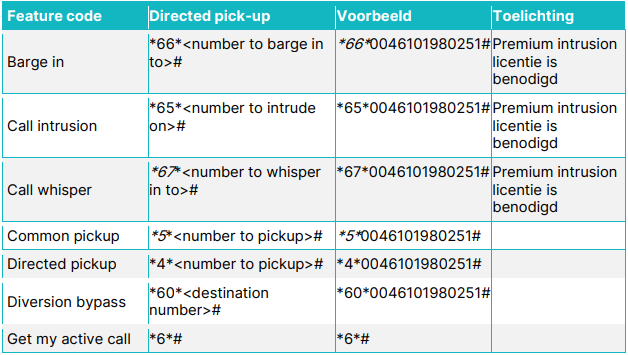
• Activate prefix: Default activation prefix *66*
• Activate suffix: Default activation suffix #
Default deactivation: Not applicable.
Example: *66*#. Refer to the Feature code table for
example.
example.
Call intrusion
The Call intrusion feature code allows a prefix to be dialled before the phone number to
activate the intrusion service.
activate the intrusion service.
• Activate prefix: Default activation prefix *65*
• Activate suffix: Default activation suffix #
Default deactivation: Not applicable.
Example: *60*#. Refer to the Feature code table for
example
example
Call whisper
The Call whisper feature code allows an ongoing call of the user of the dialled number to
be intruded and result in a coach/pupil call. The intruder (coach) can hear both parties of
the call but only talk to the intruded user (pupil).
be intruded and result in a coach/pupil call. The intruder (coach) can hear both parties of
the call but only talk to the intruded user (pupil).
• Activate prefix: Default activation prefix *67*
• Activate suffix: Default activation suffix #
Default deactivation: Not applicable.
Example: *67*#. Refer to the Feature code table for
example.
example.
Common pickup
The Common (call) pickup feature code allows a user to pick up any ringing phone that
the user has the right to pick.
the user has the right to pick.
• Activate prefix: Default activation prefix: *5*
• Activate suffix: Default activation suffix #
Example: *5*#. Refer to the Feature code table for example.
Directed pickup
The Directed (call) pickup feature code allows a user to pick up a specific ringing phone
by specifying the ringing phone’s number that the user has the right to pick up.
by specifying the ringing phone’s number that the user has the right to pick up.
• Activate prefix: Default activation prefix: *4*
• Activate suffix: Default activation suffix #
Example: *4*#. Refer to the Feature code table for example.
Diversion bypass
The Diversion bypass feature code allows the user to request a bypass of diversions on a
per-call basis.
per-call basis.
• Activate prefix: Default activation prefix: *60*
• Activate suffix: Default activation suffix #
Default deactivation: Not applicable.
Example: *60*#. Refer to the Feature code table for
example.
example.
Get my active call
The Get my active call feature code allows a user of a 3rd party phone to pick up an active
call from any other user device by pressing a feature code.
call from any other user device by pressing a feature code.
• Activate prefix – Default activation prefix *6*
• Activate suffix – Default activation suffix #
Example: *6*#. Refer to the Feature code table for example.
Number presentation
The Number presentation feature code allows users to choose the number which is
displayed as the calling number (caller ID) for an outbound call.
displayed as the calling number (caller ID) for an outbound call.
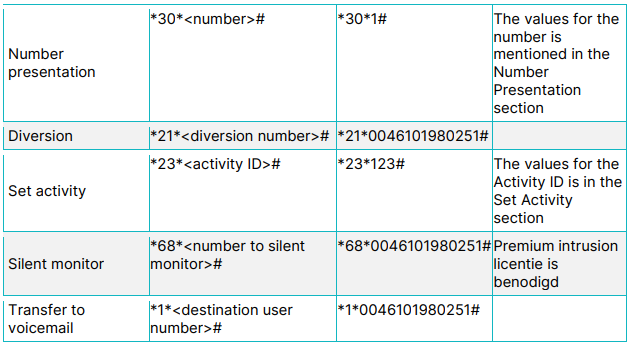
• Activate prefix: Default activation prefix *30*
• Activate suffix: Default activation suffix #
Example: *30*#. Refer to the Feature code table for example.
The number can take one of the following values
• 0: Displays the caller ID as Anonymous for all users.
• 1: Displays the user’s primary number as the caller ID for all users.
• 2: Displays user’s mobile number as the caller ID for all users.
• 3: Displays the switchboard number associated with the user as the caller ID.
Diversion
The call Diversion feature code allows the user to activate and deactivate call diversions
using the dial pad of the phone.
using the dial pad of the phone.
• Activate prefix: Default activation prefix *21*
• Activate suffix: Default activation suffix #
• Deactivate prefix: Default deactivation prefix #21#
• Deactivate suffix: Default deactivation suffix #
Example: *21*# to activate. Refer to the Feature code table for
example.
example.
Set activity
The Set activity feature code allows a user to change the activity presence information
set in the system using the dial pad of the phone.
set in the system using the dial pad of the phone.
• Activate prefix: Default activation prefix *23*
• Activate suffix: Default activation suffix #
Default deactivation: Not applicable.
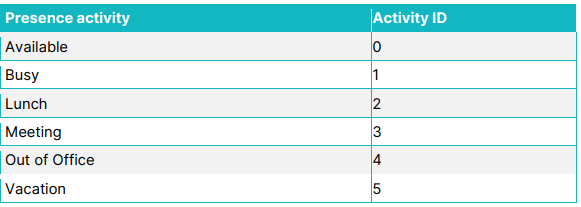
Example: *23*# to set the users activity to the state matching
. Refer to the Feature code table for example.
The following tables includes all the activity IDs for all the Presence Activities
. Refer to the Feature code table for example.
The following tables includes all the activity IDs for all the Presence Activities
Silent monitor
The Silent monitor feature code allows an ongoing call of the user of the dialled
number to be intruded and result in a call where the intruder can listen to the call
but not talk.
number to be intruded and result in a call where the intruder can listen to the call
but not talk.
• Activate prefix: Default activation prefix *68*
• Activate suffix: Default activation suffix #
Default deactivation: Not applicable.
Example: *68*#. Refer to the Feature code
table for example.
table for example.
Transfer to voicemail
The Transfer to voicemail feature code allows the user to transfer the call to
voicemail.
voicemail.
• Activate prefix: Default activation prefix *1*
• Activate suffix: Default activation suffix #
Default deactivation: Not applicable.
Example: Dial feature code, *1*#. The call is then
transferred to voice mail, where the caller may leave a message to the user
of . Refer to the Feature code table for example.
transferred to voice mail, where the caller may leave a message to the user
of . Refer to the Feature code table for example.